How to hide text and names in images | Safely process addresses, phone numbers, and QR codes
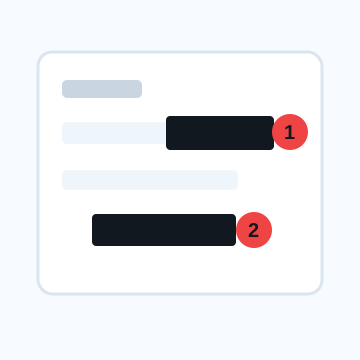
When hiding text or names in an image, blacking out or cutting out is better than mosaic or blurring. Information like addresses, phone numbers, email addresses, QR codes, order numbers, and the body of conversations should be made unreadable, not obscured.
3 ways to hide text in images
Cover with black color/shape
This is the easiest method to understand. Place an opaque square slightly larger than the text in a shape or markup in an image editing app. The QR code covers not only the center but also the entire code and surrounding area.
Cut out by trimming
If the screenshot has names and notifications lined up at the top of the screen, it's best to cut out only the necessary parts. When there are many areas to hide, it is safer to reduce the area to be shown rather than adding more detailed black paint.
Mosaic/Blur
It can be used to make background signs or distant text less noticeable. However, if the letters are large, short, or in a regular font, their shapes may remain, so they should not be used for confidential information.
Points overlooked when hiding image names
Account names, profile images, notifications, browser tab names, search windows, file names, calendar events, map pins, image ALT text, etc. can also be personal information. Don't just look at the main text of the screenshot; check all four corners.
What to check after using How to hide text and names in images
The main risk is leaving a small edge of text, a number, or a code visible after editing. When using How to hide text and names in images, make the edited area slightly larger than the target and open the exported file once before posting.
When using How to hide text and names in images, treat visual softening and redaction as separate jobs. For How to hide text and names in images, blur or mosaic can reduce detail, but sensitive text and codes are easier to check with an opaque cover.
Frequently asked questions
Can't you read the text in the image even if you hide it with mosaic?
Depending on the font size and the grain of the mosaic, you may be able to guess the content and number of characters. It is safer to black out or cut out names, addresses, numbers, and QR codes.
When hiding the image name, should I also delete the profile image?
If you do not want to identify the conversation partner or account owner, check not only the display name but also the icon, ID, post list, and background image.
Edit an Image
Use Easy Mode for quick hiding, or Advanced Mode for detailed layers, logos, and export settings.