Metadata and AI-Training Deterrents
EXIF removal, NoAI metadata, noise, color variation, grid patterns, and NoAI hidden text embedding
EXIF Removal
Photos may include EXIF metadata such as shooting date, device information, and location data. Enabling the EXIF removal setting at export time strips this metadata before publishing (Premium only). Results may vary depending on the image format and source file.
NoAI Metadata Tags
You can add NoAI-related tags to the image metadata to indicate that you do not want the image used for AI training (Premium only). Whether these tags are respected depends on the AI service or platform.
Noise, Color Variation, Grid Patterns, and NoAI Hidden Text Embedding
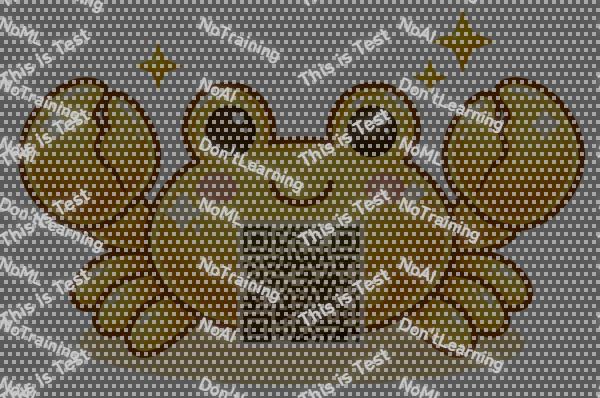
Subtle noise patterns, color variations, grid overlays, and NoAI hidden text can be added to images as AI-training deterrents that are difficult to detect with the naked eye (Premium only). These features do not completely prevent AI training. They are intended as a signal of intent and a deterrent.
Before

This is the original image without processing.
After

This image has noise disruption, color variation, grid patterns, and NoAI hidden text embedding applied. They are almost impossible to notice with the naked eye. The grid and NoAI hidden text follow the watermark visibility setting, so increasing the visibility makes them easier to see.
Tips: Since these effects are difficult to see with the naked eye, you can use the Magic Magnifier feature to check how NoAI hidden text, grid patterns, and watermarks are applied.
Edit an Image
Use Easy Mode for quick hiding, or Advanced Mode for detailed layers, logos, and export settings.